
Lucci, your pool service assistant

Meet Lucci — AI-first pool service software

Every pool serviced. Every report sent. Every invoice paid.

Lucci runs the route, lets your tech log a stop with the camera instead of a keyboard, works with no signal, takes card and ACH payments automatically — and tells you, every single day, exactly what slipped.

We're onboarding a small number of pool companies at a time, with hands-on setup.

First 50 pools free forever · No card · Run it beside your current software until you trust it

  • AI reads the test strip from a photo — no typing in the sun.
  • Works with no signal; nothing you log is ever lost.
  • Card and ACH collected automatically, fees passed on if you want.
  • A daily digest names what slipped, before the customer does.

Start free

Set up your company in about a minute.

Already have an account? Sign in

Lucci, your pool service assistant

Meet Lucci — your AI assistant

She lives on every screen. Just ask her.

Ask Lucci about the app or about what you are looking at. She answers against your own customers, routes and invoices — and she will tell you a reading and a target range. She never gives you a dose.

How do I skip a stop and say why?

The failures that cost you customers never announce themselves.

A pool goes unserviced for eleven days. A service report never sends. An active customer goes a month without an invoice. You find out when the customer calls — or cancels. Lucci checks for all of it, every day:

  • A pool was serviced but the customer never got the report.
  • A report email failed three times and needs a human.
  • An active customer with a rate has no invoice this period.
  • Open invoices past 30 days, aged 30 / 60 / 90+.
  • Stops on today's route with nothing logged by end of day.
  • Truck insurance or registration about to expire.

Every failure is recorded on the record it belongs to, surfaced in the app, and included in a daily digest. Nothing dies quietly in an activity feed nobody reads.

Stop 4 of 18 · Next

Marsh Residence

123 Palm Way · Sarasota, FL

Pool type

Saltwater pool

Gate code

2468

Entry side

Left side of house

Access notes

Latch is behind the hedge. Please close the gate securely.

Reminder · Clean the filter today
On my way Navigate

Route operations, end to end

Plan the week in the office. Run every stop from the truck.

Dashboard, map, week board, route builder, and assignments work as one system. Your team sees what is next; you see what is done, what moved, and what needs attention.

Optimize the drive

Keep your stop order, compare it with the optimized route, and see the day on a map before the truck rolls.

Watch progress live

When the dashboard or week board is open, completed stops update as the field team logs them, without wasteful polling.

Keep working offline

Readings, tasks, notes, and photos save to the phone first, then sync when signal returns.
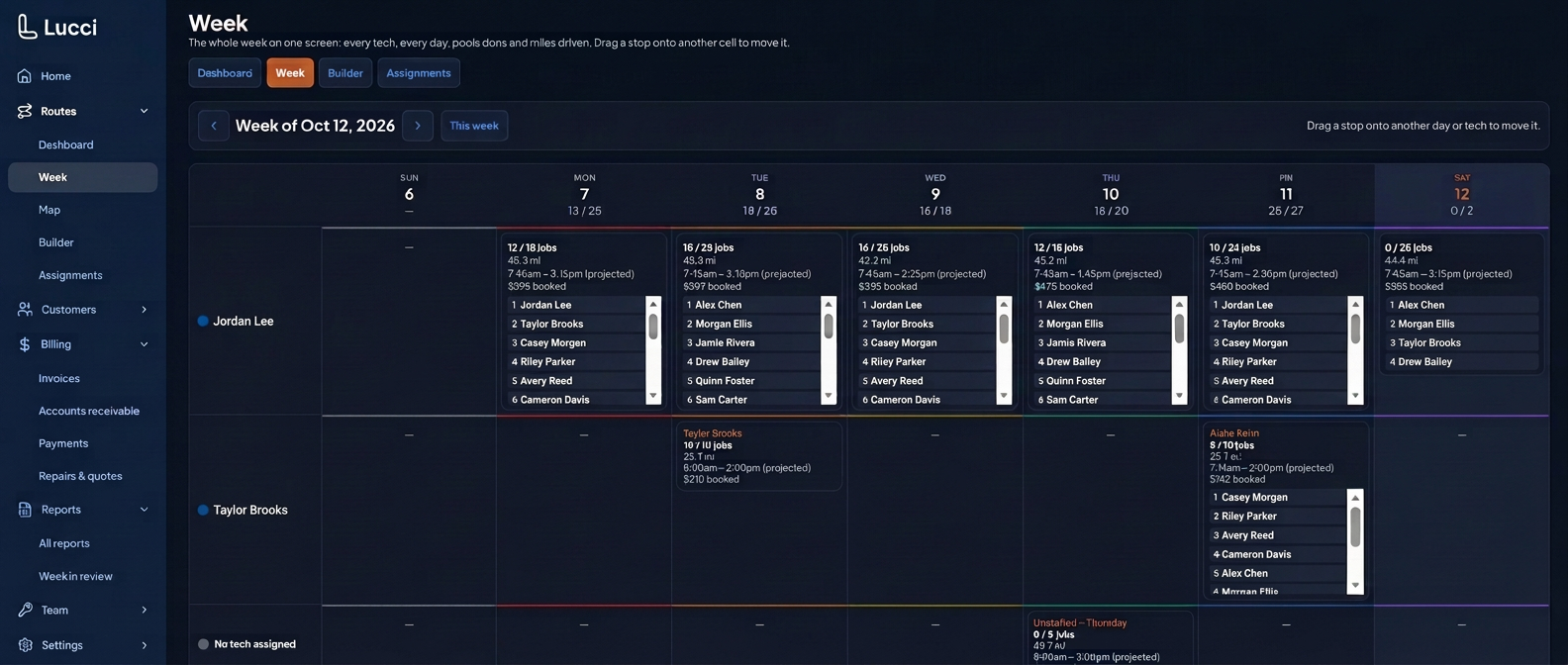
Privacy-safe Lucci week planner showing fictional technicians and ordered stops in dark mode

Every technician. Every day. One board.

Ordered stops, projected drive time, completed work, skipped visits, and booked value stay together. Drag a stop to another day or technician when the plan changes.
See route optimization
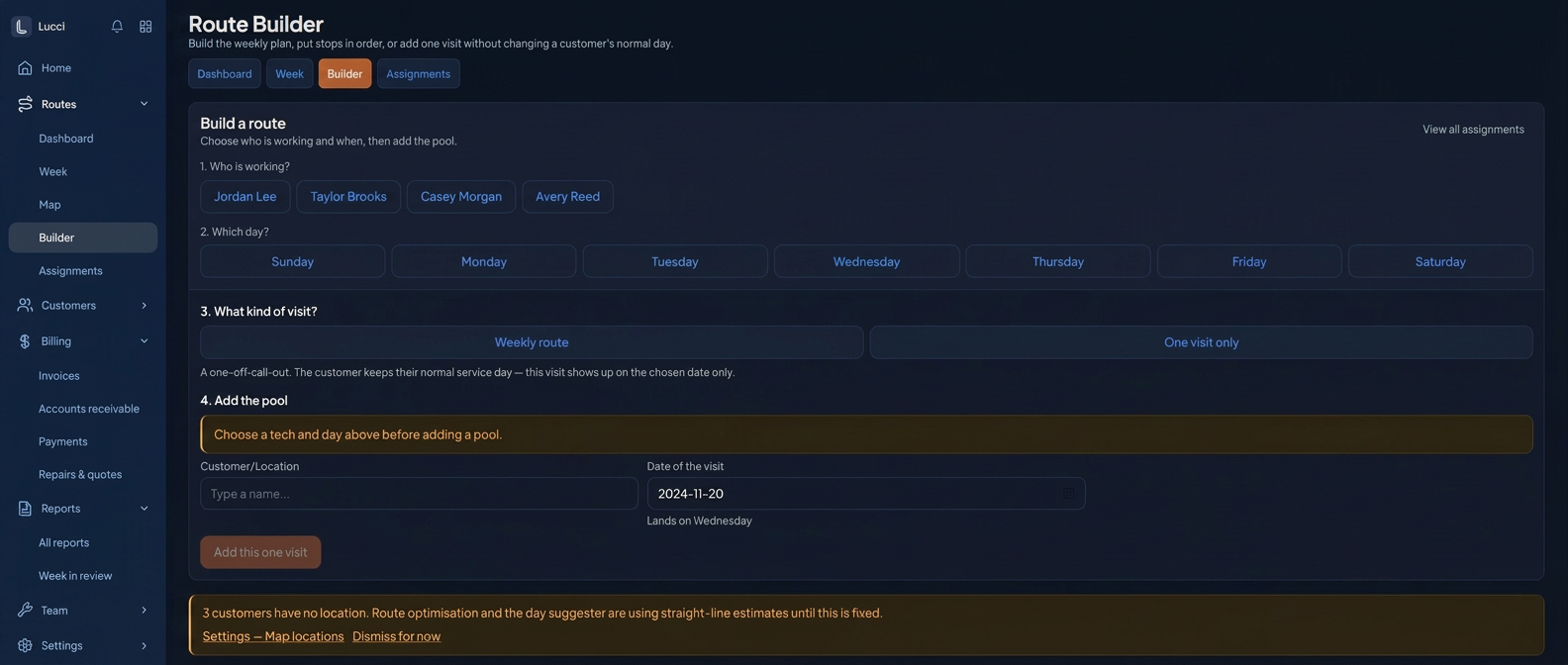
Privacy-safe Lucci route builder showing weekly and one-visit choices in dark mode

One visit or a permanent change

Add a one-off callout without changing the customer’s normal service day, or deliberately update the weekly route when the plan really changes.
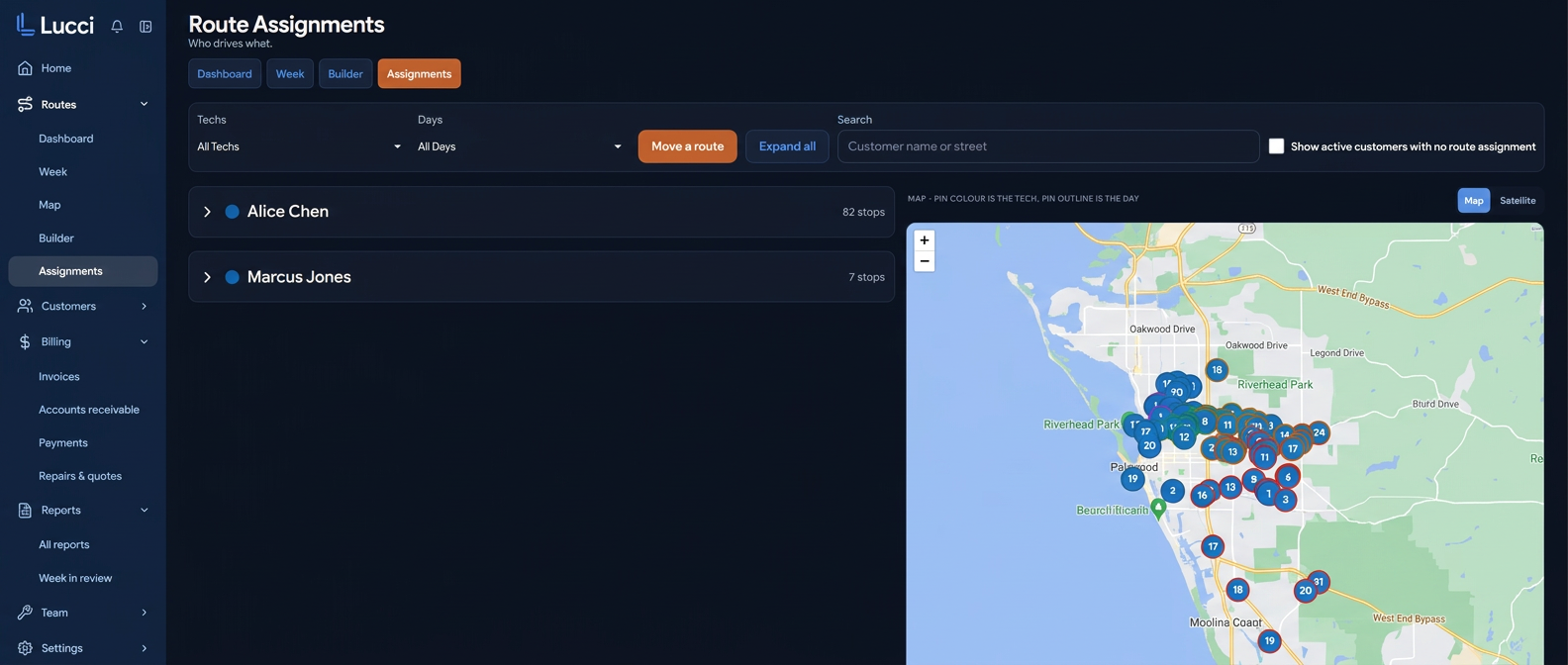
Privacy-safe Lucci route assignments screen with fictional technicians and a generic service-area map

Assignments and geography together

Filter by technician and day, find unassigned customers, and see the service area beside the route list before moving work.

Measured on a real route

4.7 fewer miles

On one 21-stop Thursday route, Lucci reduced the planned drive from 45.9 miles to 41.2 miles and trimmed about six minutes. That is a real route result, not an invented industry average.

Before

45.9 mi

With Lucci

41.2 mi

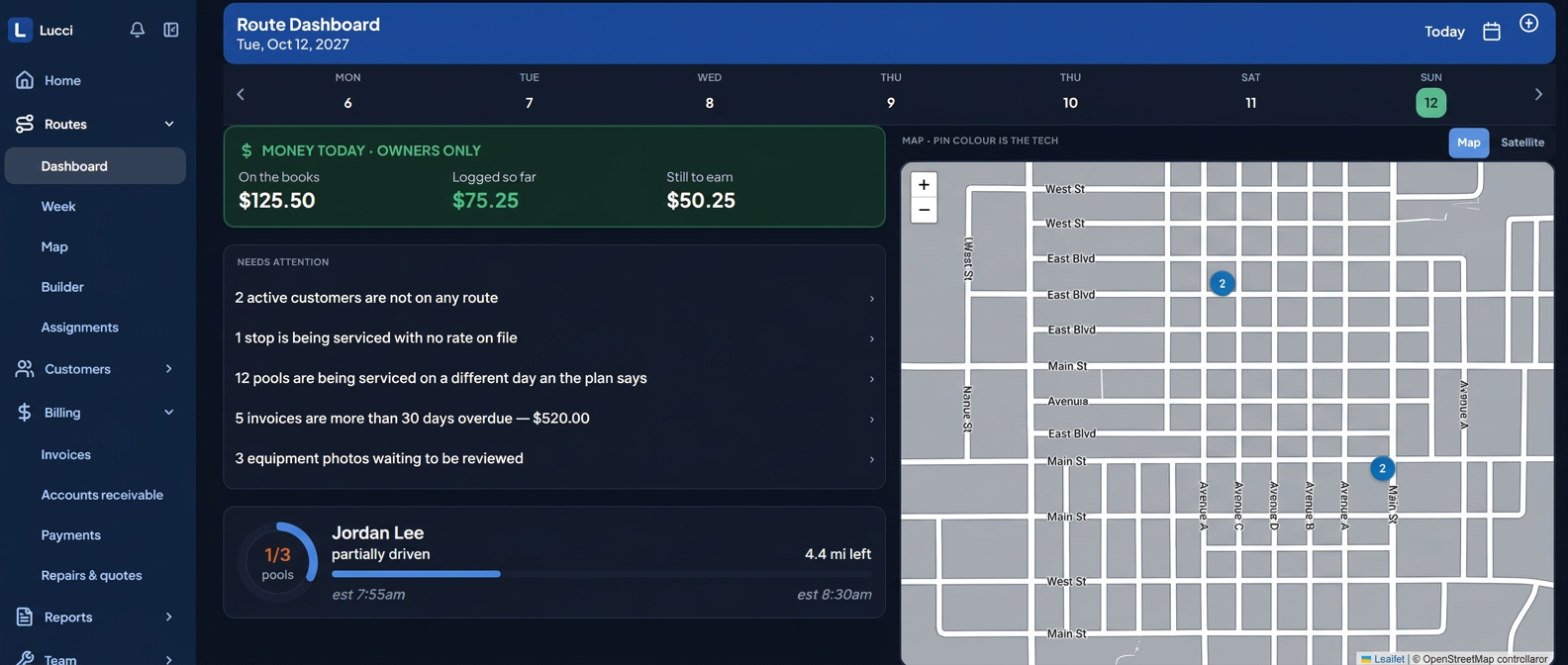
Light, dark, or system

Bright at midday. Easier on your eyes before sunrise.

Choose light mode for glare, dark mode for early starts and evening office work, or let Lucci follow the device. The choice works on phones and desktops and stays on that device.
Light Dark
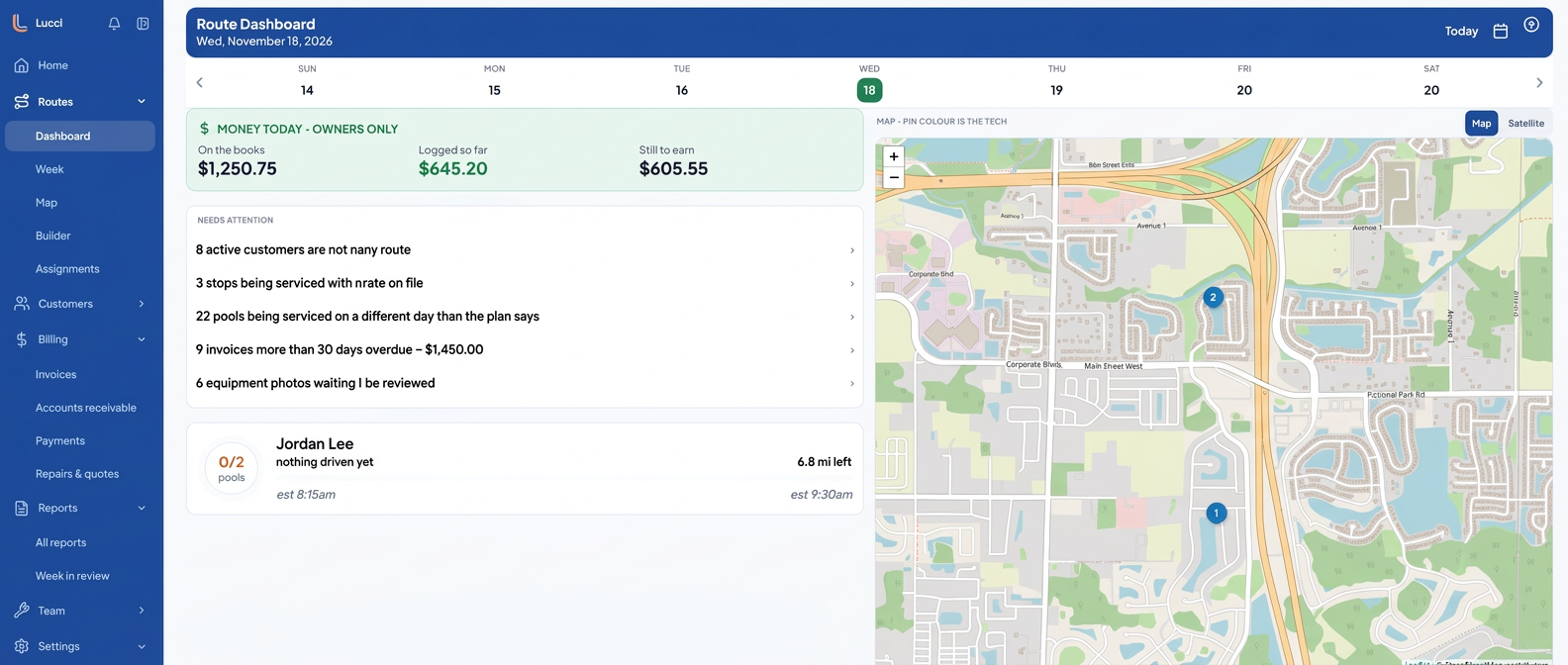
Privacy-safe Lucci route dashboard in light mode with fictional route data
Light for sun and glare
Privacy-safe Lucci route dashboard in dark mode with fictional route data
Dark for early starts and late finishes

Same controls and information on desktop and mobile.

The field view

The day’s work, readable from the truck.

Real Lucci mobile screens with representative names and figures. The same route, map, customer, and billing information follows the technician into the field without shrinking the controls into tiny targets.
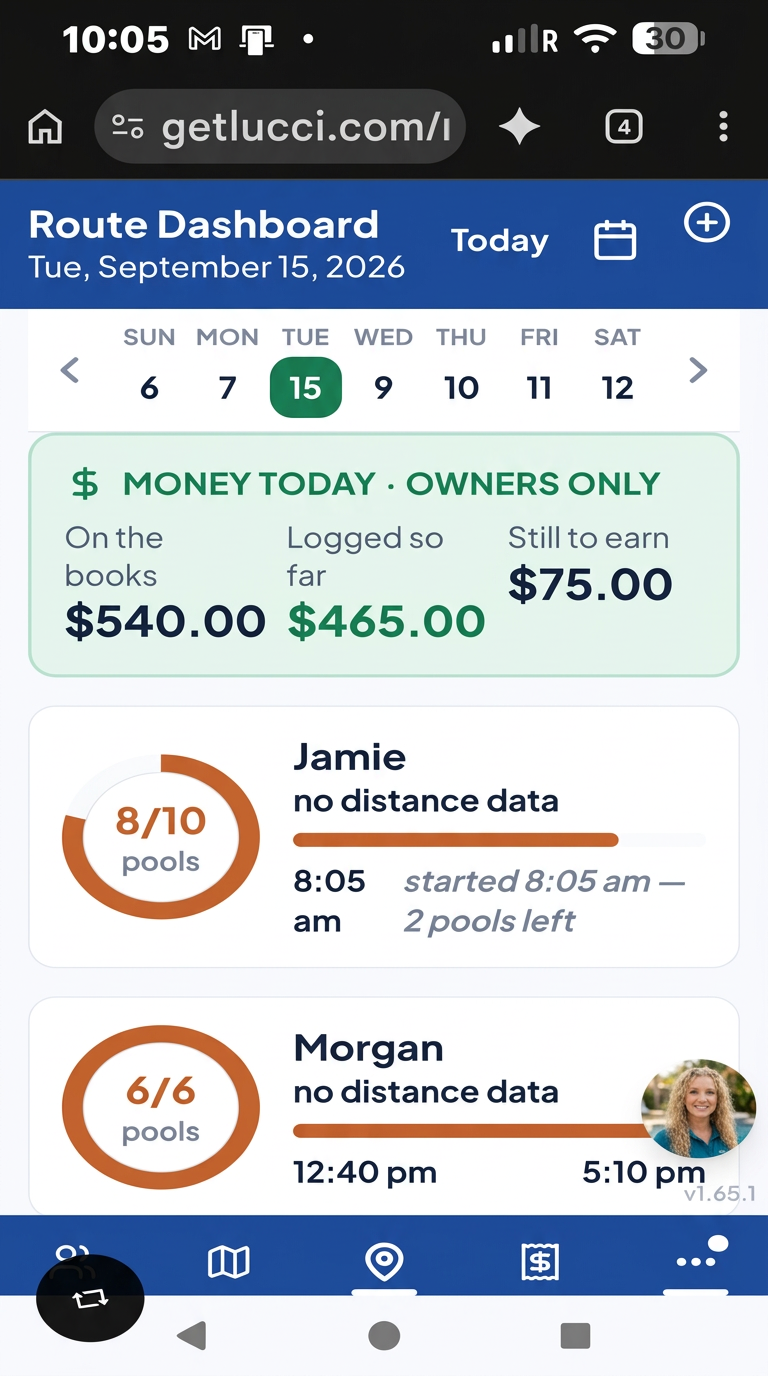
Lucci route dashboard with representative technician and route progress data

Know what is done

See every technician’s progress, completed pools, and work still left today.
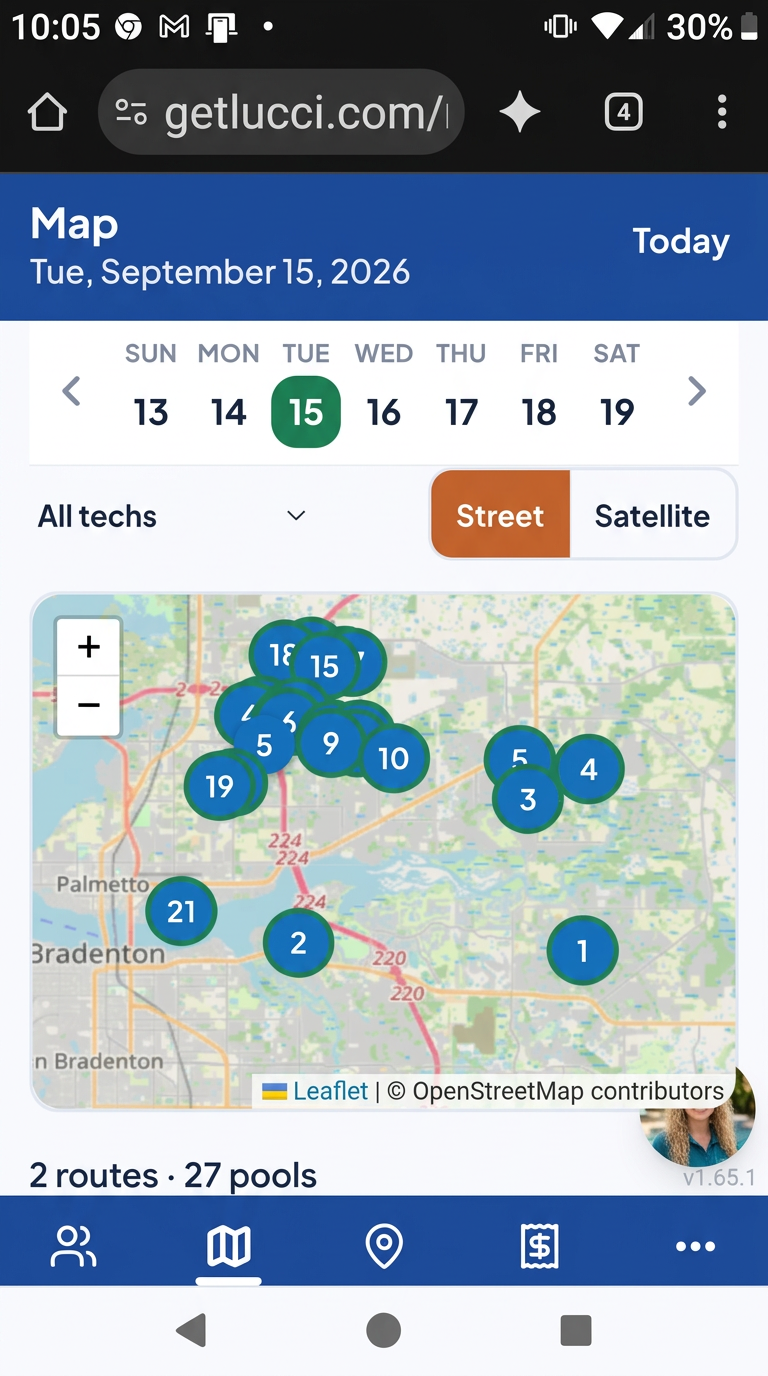
Lucci map showing representative pool stops across two routes

See the whole route

Switch between technicians and inspect the day’s stops on one mobile map.
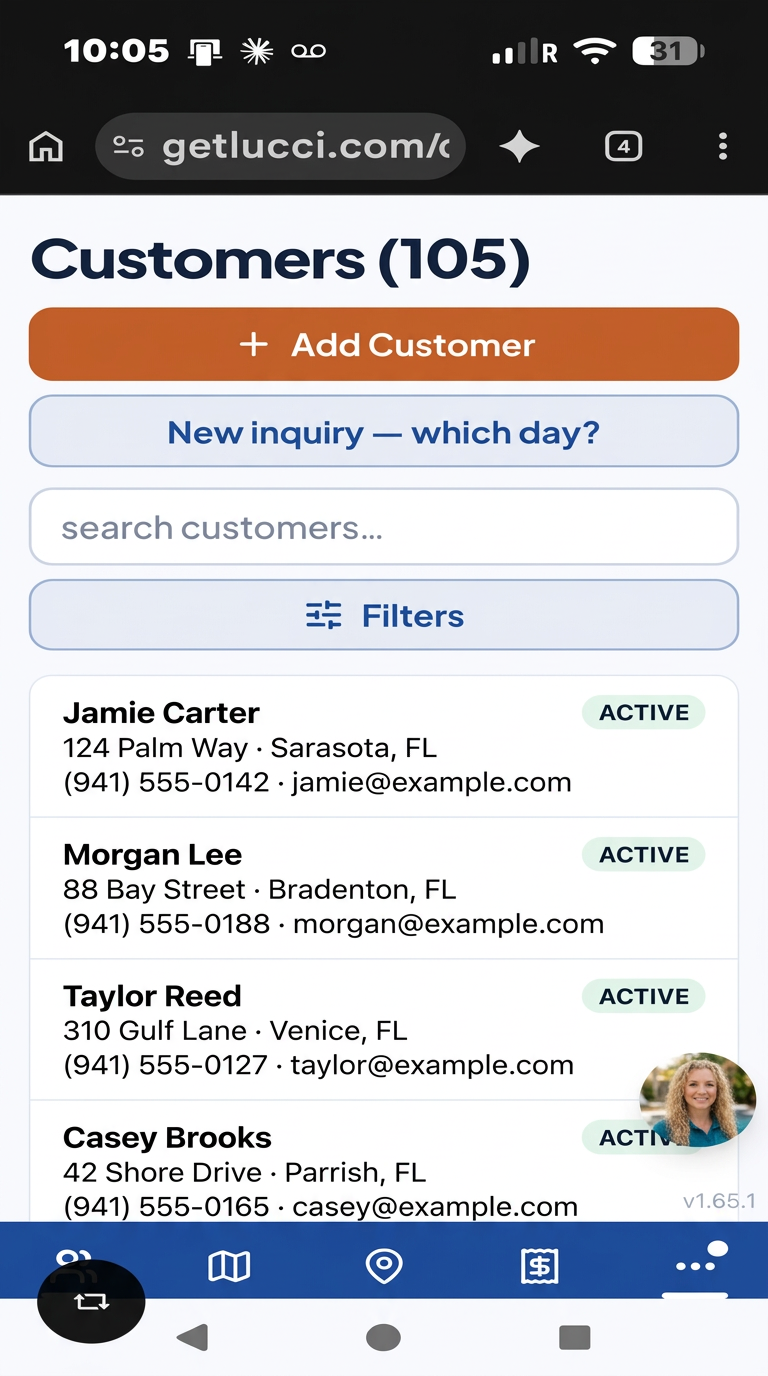
Lucci customer list populated with fictional demonstration customers

Find a customer fast

Search the customer list without digging through filters first.
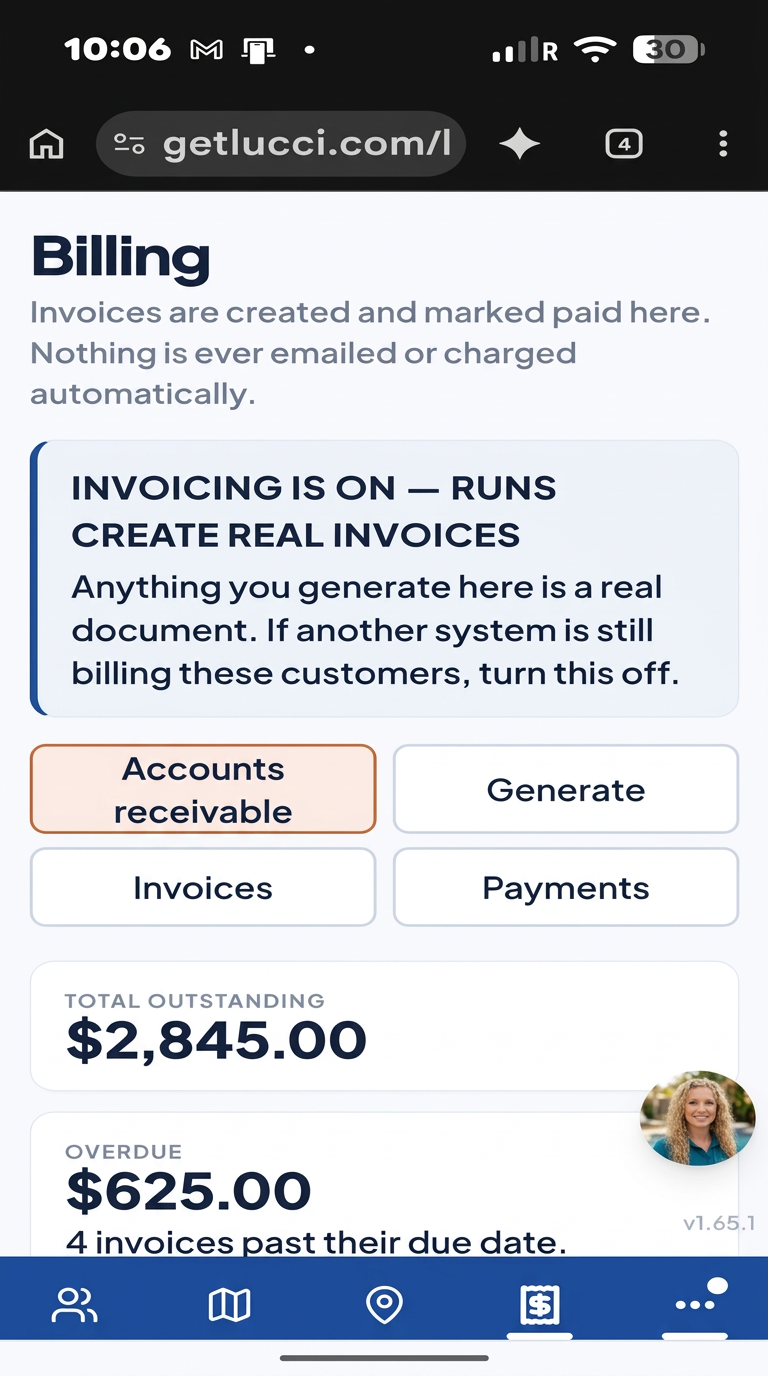
Lucci billing screen with representative outstanding invoice figures

See what needs collecting

Outstanding and overdue invoices stay visible instead of disappearing into a report.

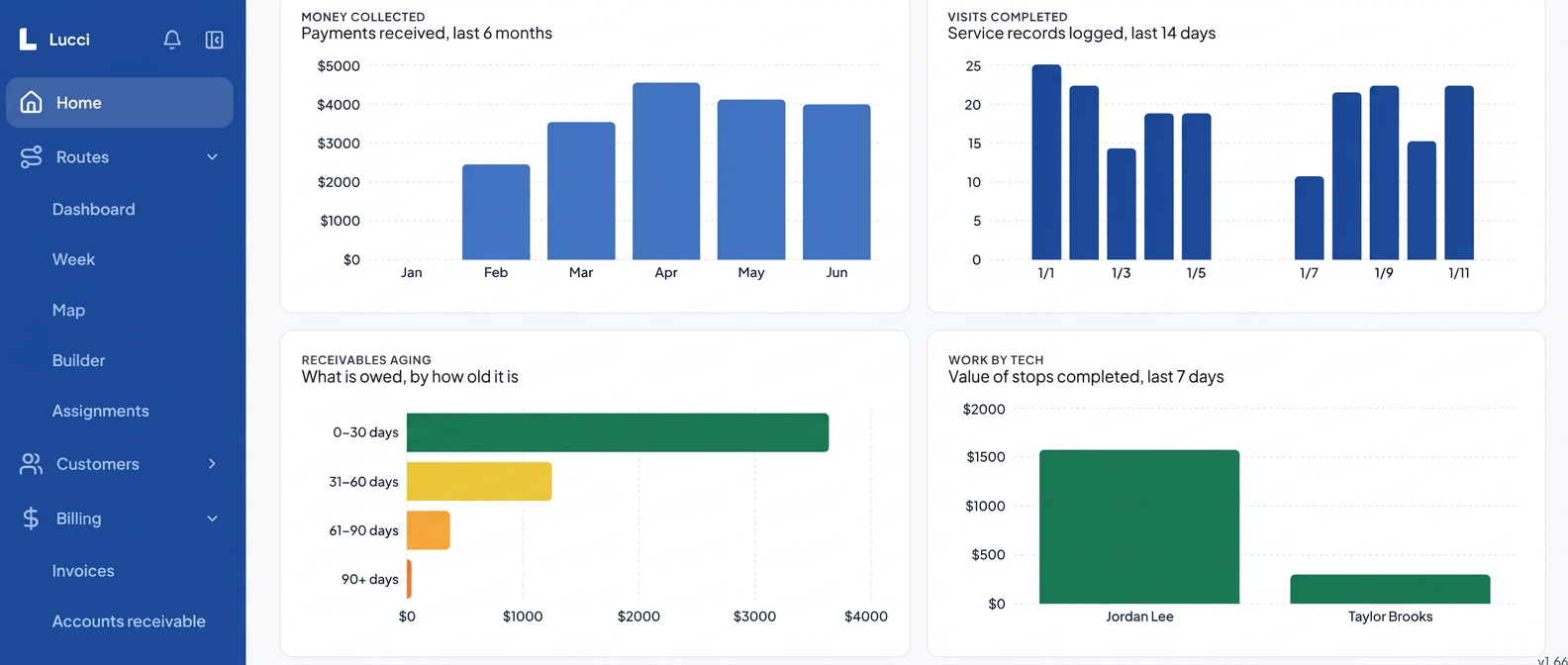
From route to results

Know what the crew did, what came in, and what is still owed.

Once the stops are logged, Lucci turns the work into a clear office view: visits completed, money collected, receivables by age, and work by technician.
  • Route work and office numbers use the same records, with no second spreadsheet.
  • Ask Lucci a plain-English question about your own figures.
  • Restricted financial information stays out of technician views.
Read the numbers without changing the records.
Privacy-safe Lucci reports overview with representative revenue, visit, receivables, and technician charts
Representative figures shown. Financial reporting is available only to authorized office roles.

Built for the truck, and the office.

Routes built for pool techs

Each tech owns their route per day. Drag stops between routes, optimize the drive, and see the whole day on a map before anyone starts the truck.

Service logging that can't lose a stop

Readings, tasks, and photos logged at the pool. Every write saves on the phone first and syncs when signal returns — offline is the default, not an error.

Invoicing prorated by visits

Draft the month's invoices priced on the visits actually scheduled. A customer who started mid-month pays for the visits they got. Nothing charges automatically.

The watchdog

Every day it checks for the work that silently didn't happen — missed pools, unsent reports, unbilled customers — and puts it on the screen you already open, in plain language, with the customer named.

On one real 21-stop Thursday route, our optimized order measured 41.2 miles against the 45.9 the crew was already driving. See how the route optimizer works.

What it deliberately is not: no customer portal, no marketing suite, and it will never tell anyone how much of a chemical to add. It records what was measured and what the tech did.

Point the camera. That's it.

The AI does the typing. Your tech keeps both hands on the pool.

Typing on a phone in the sun with wet hands is how records get skipped. In Lucci, a photo is the input: vision AI reads the test strip, names the pump, filter and heater on the pad, and drafts the service report from what was logged. Snap it and the record fills itself in — you just confirm. And Lucci is on every screen: ask her a question in plain English and she answers against your own customers, routes and invoices.

Identify equipment from a photo

Photograph the pad and the AI reads the pump, filter, heater and salt cell — make, model and serial where it can see them. It lands in a review queue so a person confirms before it becomes the pool's record.

Read a test strip from a photo

Hold the strip to the camera and the readings come back filled in — free chlorine, pH, alkalinity, hardness, cyanuric acid. The tech confirms or corrects. No squinting at a colour chart, no typing seven numbers.

Filter cleans, photographed and dated

The AI recognises the filter type from the photo and logs the clean against a cadence you set. When it's due for replacement, one tap emails the owner a quote with an approval link.

Service reports drafted for you

The report writes itself from what was actually logged: readings, tasks completed, chemicals added, and the photos. You approve; the customer gets it before the truck leaves the driveway.

Ask Lucci anything about your business

Plain-language questions against your own data — which customers are unbilled, whose pool is trending high, what a route earned last month. Answers cite the records they came from.

New customer? It tells you where they fit

Type an inquiry address and Lucci says which tech, which day and which point in the route it belongs to, based on the drive you already run — before you quote the job.

One thing the AI will never do: tell anyone how much of a chemical to add. It reports what was measured and what your tech recorded. Dosing stays with the trained person standing at the pool — that is a product decision, not a missing feature.

Lucci, your pool service assistant

Ask Lucci

"Which customers are overdue?" "What did we record at this pool last time?" "How much will I make today?" Lucci answers in plain English against your own data — a person on the other end of your software, not a help article.

We're new — and that's the deal

Built with pool companies, not at them.

Lucci is early. No thousands of reviews, no sales team. What you get instead is a direct line to the people building it — and features shaped by what your company actually does on a Tuesday.

  • Tell us what's wrong, we fix it

    Send feedback from inside the app. Early companies get their issues looked at the same week, not filed in a queue.

  • Custom changes for your company

    Your own checklists, tasks, chemicals, report wording and targets are already settings. If you need something we don't have, ask — we build for early customers.

  • Founding-customer pricing

    Your rate is locked at $1 per pool per month — first 50 free, capped at $249 — for as long as you stay. Nothing you use today moves behind a higher tier later.

Get paid faster

Stop chasing cheques you can't even mark paid.

Invoices go out with a pay link. The homeowner taps it, pays by card or bank, and Lucci marks it paid the second the money clears — no one keys anything in. Save the card and next month bills itself.

  • Card and ACH through Stripe, settled straight to your bank.
  • Optional surcharge so the processing fee lands on the payer, not you.
  • Recurring monthly billing on a saved payment method.
  • A failed charge is shown on the invoice with the real reason — never silently retried into nothing.
  • One-way QuickBooks Online push for customers, invoices and payments.

Switch painlessly

Run Lucci beside Skimmer until you're sure.

Export your customers, routes and service history from Skimmer, import them here in a few minutes, and run both for a week. Keep billing where it is until the routes look right — then move it over on your own schedule.

  • Guided CSV import for customers, routes and invoices.
  • Skimmer-imported invoices keep their original numbers — no duplicates.
  • Your Skimmer stop order is preserved, tech by tech.
  • Nothing is deleted from Skimmer. Walk away any time.
See the step-by-step switch guide

Everything's in the one price.

No tiers, no add-on modules, no “contact sales” for the useful half.

In the truck

  • Route dashboard for the day, one tap per stop
  • Works fully offline — writes queue and sync themselves
  • One-tap “on my way” text with a live arrival window
  • Turn-by-turn navigation from every stop row
  • Readings, tasks, chemicals used and photos per visit
  • Last four visits visible while you stand at the pool
  • Gate codes, dog warnings, entry side and access notes
  • Skip a stop with a reason that reaches the office

In the office

  • Routes belong to techs, not to days
  • Drag stops between routes and days on the week board
  • Drive-time optimisation and a live map of the day
  • Customers, pools, contacts, equipment and history
  • Invoicing prorated by the visits actually scheduled
  • Payments, AR aging at 30 / 60 / 90+, and a full ledger
  • One-way QuickBooks Online sync with per-row status
  • Fleet: vehicles, insurance and registration expiry

So nothing slips

  • Daily watchdog digest by email and web push
  • Missed pools named, with the customer and the date
  • Failed report emails surfaced instead of buried
  • Active customers with no invoice this period
  • Completed stops with no photo attached
  • Work stuck offline for more than 12 hours
  • GPS and photo verification that the tech was there
  • 12 exportable reports plus AI insights
See every feature in detail

$1 per pool. Capped at $249.

Everyone else bills per pool or per tech, so every account you win puts your bill up. We stop at $249. First 50 pools are free — most one-truck operators never pay us anything.

  • Unlimited customers, routes and techs
  • Offline-first service logging with photos
  • Route optimisation and the week schedule board
  • Invoicing prorated by visits, payments and AR aging
  • The daily watchdog digest by email and push
See full pricing and the calculator

Per pool

$1 /pool /mo

first 50 free · capped at $249/mo

first 50 pools free, no time limit · no card

Start free

Run tomorrow's route knowing yesterday's actually happened.